respect
📖 Panduan Penggunaan Lengkap
Respect Desktop menyediakan dua metode fleksibel untuk membuat aplikasi desktop Windows mandiri: melalui Antarmuka Grafis (GUI Desktop Builder) yang ramah pengguna, atau melalui Baris Perintah (CLI) untuk keperluan otomasi dan script pengembang.
1. Menggunakan GUI Desktop Builder
Antarmuka GUI Builder aktif secara otomatis saat Anda mengeklik ganda file executable respect.exe atau respect-lite.exe yang belum dipasangi aplikasi.
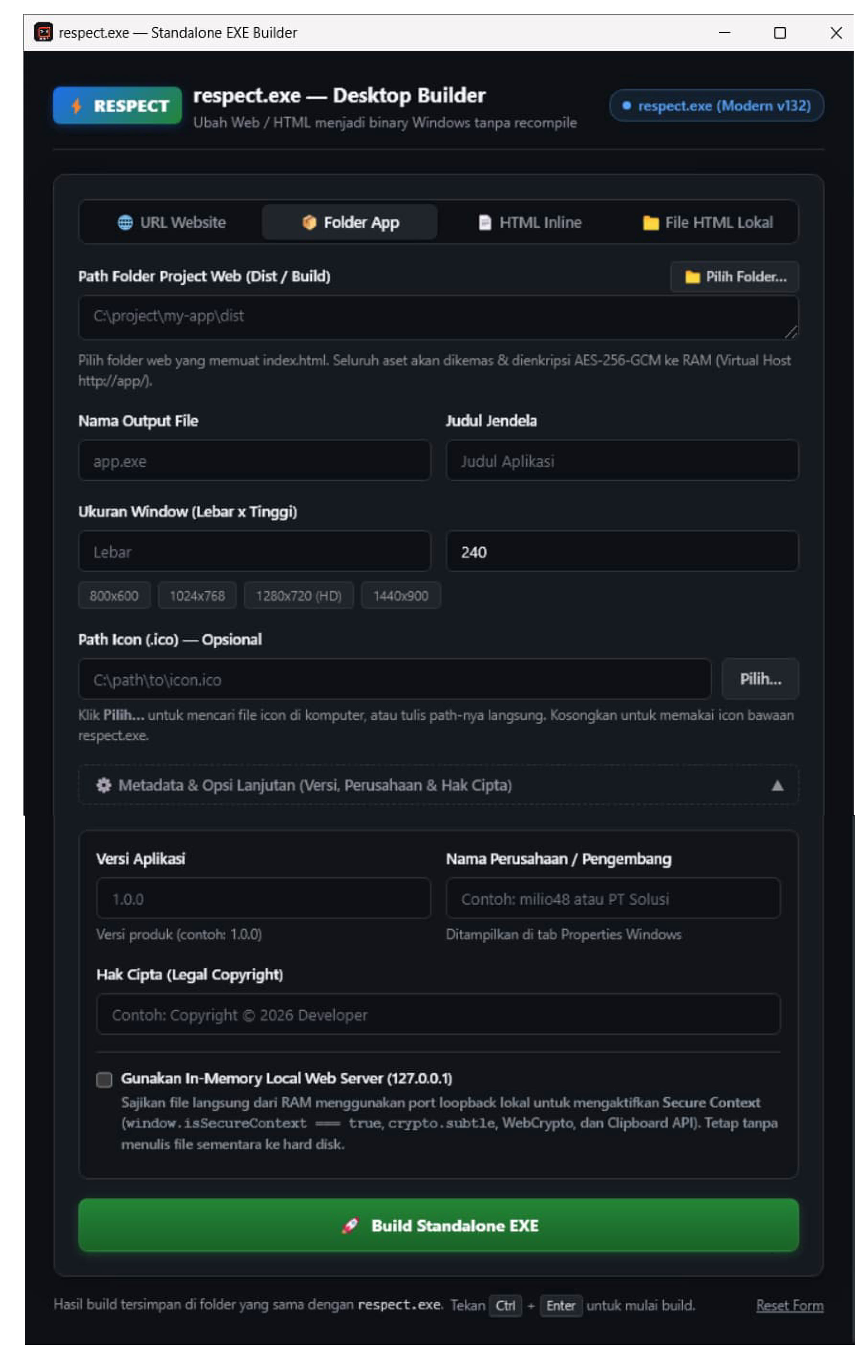
Antarmuka GUI Desktop Builder Respect Desktop
Langkah-Langkah Penggunaan:
- Unduh Executable: Ambil
respect.exe(Modern) ataurespect-lite.exe(Lite) dari halaman GitHub Releases. - Jalankan Aplikasi: Klik ganda file
.exe. Jendela Desktop EXE Builder akan terbuka. - Pilih Mode Sumber Konten:
Tersedia 4 mode pada segmented control di bagian atas:
- 🌐 URL Website (
url): Masukkan tautan web lengkap (contoh:https://my-app.example.com). Builder akan mengemas aplikasi yang membuka halaman web online secara mandiri tanpa address bar atau gangguan browser. - 📦 Folder App (V2) (
dir): Mengemas seluruh direktori proyek web frontend (hasil build dari Vite, React, Vue, Svelte, atau static SPA) ke dalam format In-Memory Virtual Host. Konten disajikan dari RAM tanpa web server lokal dan tanpa port TCP. Klik tombol 📁 Pilih Folder… untuk membuka dialog pemilihan folder native Windows. - 📄 HTML Inline (
html): Mengetikkan atau menempelkan potongan kode HTML/CSS/JS secara langsung ke dalam editor teks monospace. Jika kode tidak memiliki<!DOCTYPE html>, sistem akan membungkusnya secara otomatis ke format HTML5 yang valid. - 📁 File HTML (V2) (
file): Memilih satu file.htmllokal di komputer Anda. Klik tombol 📄 Pilih File HTML… untuk memilih file secara native.
- 🌐 URL Website (
- Isi Pengaturan Dasar:
- Nama Output File: Nama binary yang akan dihasilkan (contoh:
AplikasiSaya.exe). Ekstensi.exeakan ditambahkan otomatis jika belum ada. - Judul Jendela: Teks yang tampil pada titlebar aplikasi desktop Anda.
- Ukuran Window: Tentukan lebar dan tinggi jendela dalam piksel (contoh:
1024 x 768), atau klik tombol preset resolusi cepat (chips).
- Nama Output File: Nama binary yang akan dihasilkan (contoh:
- Pengaturan Lanjutan (Opsional):
Klik ⚙️ Pengaturan Lanjutan (Icon, Versi, Metadata) untuk mengonfigurasi:
- File Icon (.ico): Path file
.icokustom. Anda bisa mengetik path atau klik tombol Pilih Icon…. - Versi Aplikasi: Format penomoran versi Windows (contoh:
1.0.0). - Nama Perusahaan / Pengembang: Nama Anda atau organisasi pengembang.
- Hak Cipta (Copyright): Informasi lisensi atau hak cipta (contoh:
Copyright © 2026 Developer).
- File Icon (.ico): Path file
- Dukungan Drag & Drop:
Anda bisa langsung menyeret (drag and drop) file atau folder dari Windows File Explorer ke jendela Builder:
- Menyeret Folder otomatis mengalihkan mode ke
📦 Folder Appdan mengisi path. - Menyeret file
.htmlotomatis beralih ke📁 File HTMLdan mengisi path. - Menyeret file
.icootomatis mengisi kolom icon kustom.
- Menyeret Folder otomatis mengalihkan mode ke
- Bangun Aplikasi:
Klik tombol hijau ⚡ Build Standalone EXE (atau tekan
Ctrl + Enter). Dalam hitungan detik, aplikasi desktop mandiri siap pakai akan terbit di folder yang sama!
2. Menggunakan Baris Perintah (CLI Automation)
Bagi pengembang yang ingin mengintegrasikan Respect ke dalam pipeline CI/CD, skrip PowerShell, npm script, atau batch file, Respect menyediakan antarmuka CLI yang kaya fitur.
Sintaks Dasar:
.\respect.exe --build [opsi...]
Contoh Penggunaan CLI:
A. Membuat Aplikasi dari URL Website
.\respect.exe --build --source "https://chat.openai.com" --out "ChatGPT.exe" --title "ChatGPT Desktop"
B. Mengemas Seluruh Folder Frontend (React / Vue / Vite Build)
.\respect.exe --build --dir "C:\proyek\frontend\dist" --out "Dashboard.exe" --title "Dashboard Admin"
C. Membuat Aplikasi dari Kode HTML Inline
.\respect.exe --build --mode html --source "<h1>Halo Dunia!</h1><p>Aplikasi desktop Respect.</p>" --out "HaloApp.exe"
D. Membuat Aplikasi Lengkap dengan Icon dan Metadata Perusahaan
.\respect.exe --build `
  --dir ".\dist_web" `
  --out "POS_System.exe" `
  --title "Point of Sale 2026" `
  --width 1366 `
  --height 768 `
  --icon ".\assets\pos.ico" `
  --app-version "2.1.0" `
  --company "PT Ritel Digital Indonesia" `
  --copyright "Copyright © 2026 PT Ritel Digital Indonesia"
E. Memeriksa Versi Engine
.\respect.exe --version
# atau shorthand:
.\respect.exe -v
3. Daftar Lengkap Parameter CLI
| Parameter | Tipe | Default | Deskripsi |
|---|---|---|---|
--build |
Boolean | false |
Menandakan eksekusi mode builder baris perintah. |
--mode |
String | url |
Mode konten: url (website), dir / app (folder web V2), html (inline string), file (single file), atau server (in-memory local server). |
--server |
Boolean | false |
Mengaktifkan in-memory local HTTP server (127.0.0.1) dari RAM (tanpa ekstraksi ke disk) untuk mengaktifkan Secure Context (crypto.subtle, Clipboard API). |
--source |
String | "" |
Teks sumber: URL, path file HTML, atau kode HTML inline. |
--dir |
String | "" |
Path direktori frontend web untuk dikemas ke dalam V2 In-Memory Virtual Host. |
--out |
String | demo.exe |
Nama atau path file output .exe yang akan dihasilkan. |
--title |
String | respect.exe |
Judul jendela (titlebar) aplikasi yang dibangun. |
--width |
Integer | 800 |
Lebar awal jendela aplikasi dalam satuan piksel. |
--height |
Integer | 600 |
Tinggi awal jendela aplikasi dalam satuan piksel. |
--icon |
String | "" |
Path file icon .ico eksternal yang akan disuntikkan ke PE resource. |
--app-version |
String | 1.0.0 |
Nomor versi aplikasi Windows (disuntikkan ke PE FileVersion & ProductVersion). |
--company |
String | "" |
Nama perusahaan atau pengembang pada properti file Windows. |
--copyright |
String | "" |
Teks hak cipta / legal copyright pada properti file Windows. |
--version, -v |
Boolean | false |
Menampilkan informasi versi aplikasi dan engine browser yang aktif. |
4. Tips Distribusi & Keamanan Binary
- Zero-Dependency: File
.exeyang dihasilkan bersifat 100% mandiri (single executable). Pengguna akhir tidak perlu menginstal runtime tambahan, Microsoft Visual C++ Redistributable, .NET Framework, ataupun Google Chrome. - Portabel: Anda dapat langsung mengunggah file hasil build ke server unduhan, flashdisk, Google Drive, atau GitHub Releases tanpa perlu membungkusnya ke dalam file
.zip. - Isolasi Penuh: Setiap aplikasi yang dibangun memiliki sandbox data terisolasi di
%LocalAppData%\respect_desktop\apps\<appName>\, menjaga folder kerja aplikasi tetap bersih dan bebas dari file sampah (clean working directory).
| ⬅️ Kembali ke Daftar Isi | Selanjutnya: 2. Perbandingan Edisi & Standar Web ➡️ |